Spring JPA Specification API usage
This post is going to be about the Specification API of spring boot data JPA. This concept is not much popular these days but i think it has a really good potential to make it easier develop data driven applications. The specification api lets you write complex sql queries without diving into details of Criteria API or any native SQL queries. I will show you how to use it in a small project that you can work on later. If you are lazy, you can download it from here :) But this project has some prerequisites. You need to know and prepare these requirements beforehand to work with the sample project:
- Spring boot knowledge (You can check out this post)
- Java 8 or java 11 installed
- Eclipse or Intellij if you prefer
- Postgresql or another RDBMS installed
Project creation
First thing first, we will need the spring boot project created in Spring Initializr. Even though this is a very basic and small project, there are some details that we shouldn't miss or overlook. You can create the project with these dependencies.
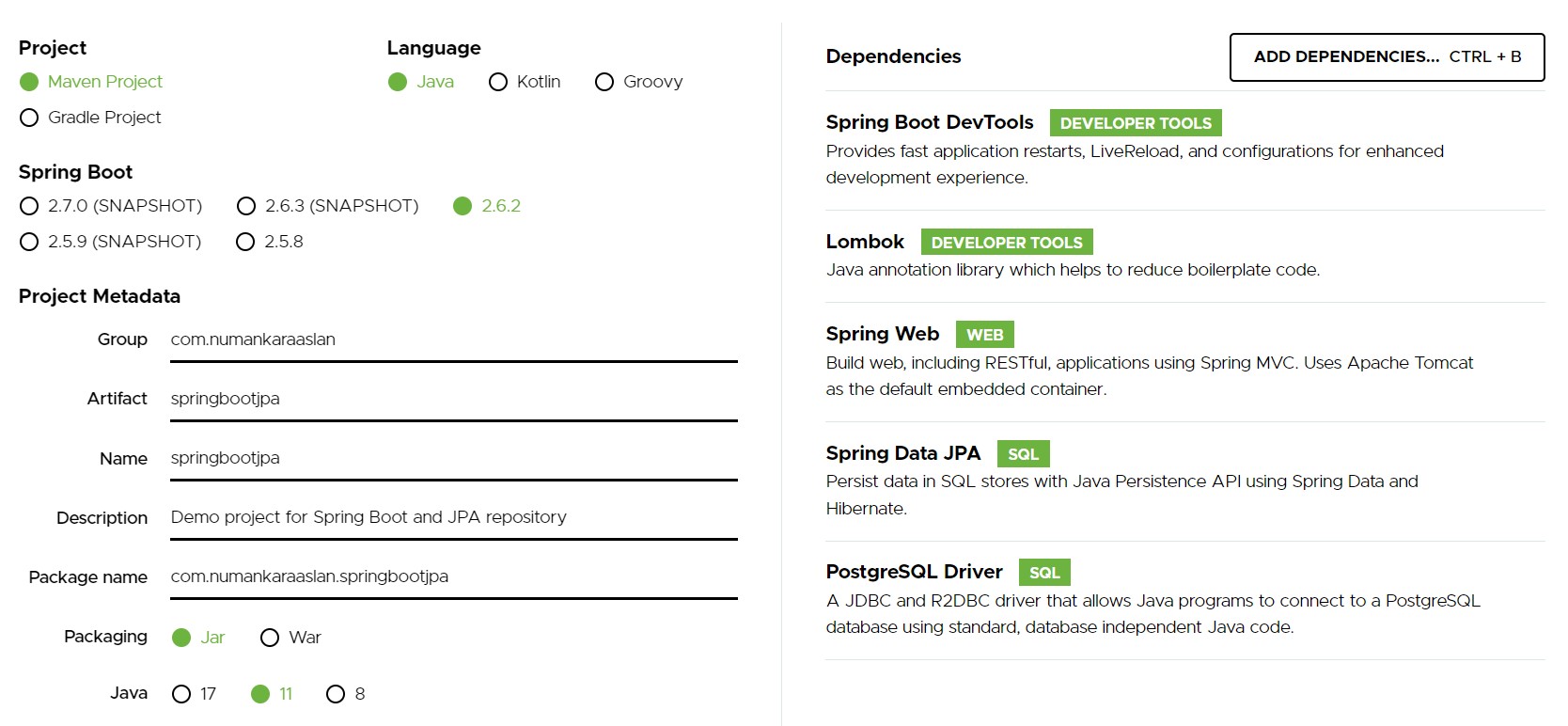
Briefly, devtools dependency reloads the tomcat server behind on code changes and project builds. This project will be a basic restful service so i have also added spring web. Lombok is there to help us shorten the code by generating getters and setters and constructors. The last 2 are the important once here. Spring data jpa uses Hibernate under the hood and hibernate uses postgresql driver to connect to the database.
Database preparation
Now it is time to prepare the database and schema in postgresql. You should install PgAdmin to be able to manage the database. You can create a database and a schema like the images below.
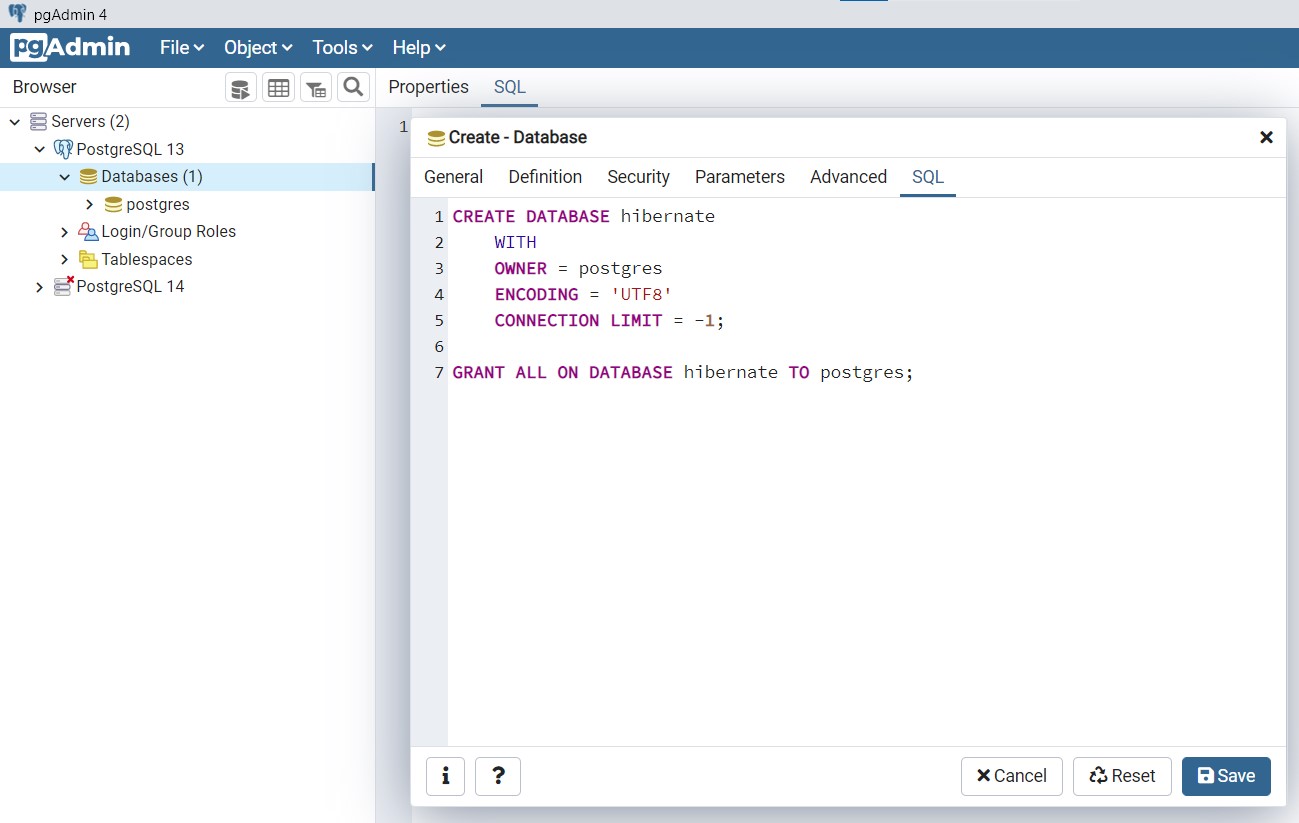
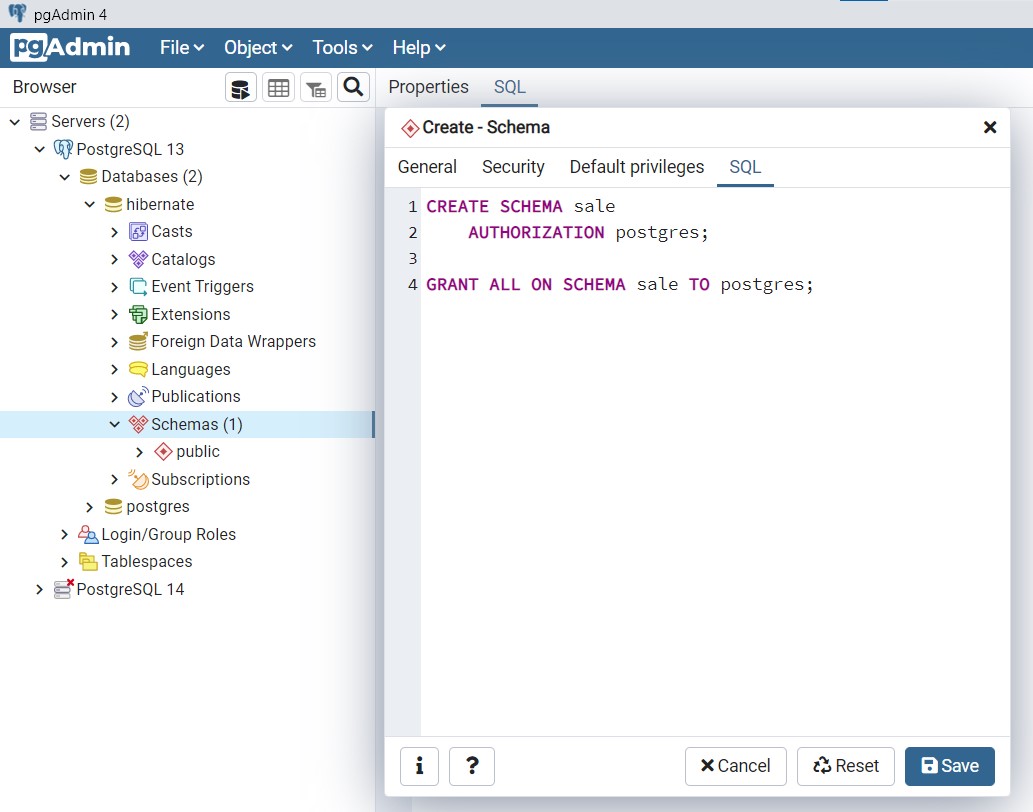
We are using the default postgresql user, which is postgres, and giving all the priviliges and the ownerships to this user. After the database creation and setup, you can import the project you have created as a maven project into your eclipse IDE. It is time to start actual coding.
Models and repositories
As most of you know by now, our projects are containing models and repositories. Models are the database tables and the repositories are the database access classes. In this small project i will implement a very basic Person, Product and a Sale table to join these to. You can create these 3 classes with the help of hibernate like below. I have also included comments to explain what i have done.
import javax.persistence.Column;
import javax.persistence.Entity;
import javax.persistence.GeneratedValue;
import javax.persistence.GenerationType;
import javax.persistence.Id;
import javax.persistence.Table;

import lombok.AllArgsConstructor;
import lombok.Getter;
import lombok.NoArgsConstructor;
import lombok.Setter;

// This class is an entity and it will be managed by persistance context of the hibernate
@Entity
// This class will be represented as a table in the database schema "sale" and will be named as "person"
@Table(schema = "sale", name = "person")
// Lombok automatically inserts getters, setters, all argument and no argument constructors
@Getter
@Setter
@AllArgsConstructor
@NoArgsConstructor
public class Person
{
	// This id column is the primary key
	@Id
	// It will be incremented by 1 on every insert
	@GeneratedValue(strategy = GenerationType.IDENTITY)
	private long id;

	// We will need 1 argument constructor while creating a sale object later
	public Person(long id)
	{
		this.id = id;
	}

	@Column
	private String name;

	// This one to many relationship can be established like this with sales
	// But i won't use it to be able to emphasis on the specification api
	// @OneToMany(mappedBy = "person", fetch = FetchType.EAGER)
	// private List<Sale> sales = new ArrayList<Sale>();
}
The same structure goes for the Product class table and class. There are no notes here.
import javax.persistence.Column;
import javax.persistence.Entity;
import javax.persistence.GeneratedValue;
import javax.persistence.GenerationType;
import javax.persistence.Id;
import javax.persistence.Table;

import lombok.AllArgsConstructor;
import lombok.Getter;
import lombok.NoArgsConstructor;
import lombok.Setter;

@Entity
@Table(schema = "sale", name = "product")
@Getter
@Setter
@AllArgsConstructor
@NoArgsConstructor
public class Product
{
	@Id
	@GeneratedValue(strategy = GenerationType.IDENTITY)
	private long id;

	public Product(long id)
	{
		this.id = id;
	}

	@Column
	private String name;

	@Column
	private int price;

	// @OneToMany(mappedBy = "product", fetch = FetchType.EAGER)
	// private List<Sale> sales = new ArrayList<Sale>();
}
The sale table is the join table of person id and product id. I have also used id column for this table too.
import java.util.Date;

import javax.persistence.Column;
import javax.persistence.Entity;
import javax.persistence.GeneratedValue;
import javax.persistence.GenerationType;
import javax.persistence.Id;
import javax.persistence.JoinColumn;
import javax.persistence.ManyToOne;
import javax.persistence.Table;
import javax.persistence.Temporal;
import javax.persistence.TemporalType;

import org.hibernate.annotations.OnDelete;
import org.hibernate.annotations.OnDeleteAction;

import lombok.AllArgsConstructor;
import lombok.Getter;
import lombok.NoArgsConstructor;
import lombok.Setter;

@Entity
@Table(schema = "sale", name = "sale")
@Getter
@Setter
@AllArgsConstructor
@NoArgsConstructor
public class Sale
{
	@Id
	@GeneratedValue(strategy = GenerationType.IDENTITY)
	private long id;

	// One product can be sold multiple times
	@ManyToOne
	@JoinColumn
	@OnDelete(action = OnDeleteAction.CASCADE)
	private Product product;

	// One product can be sold to multiple people
	@ManyToOne
	@JoinColumn
	@OnDelete(action = OnDeleteAction.CASCADE)
	private Person person;

	@Column
	// The sale date is a timestamp in the database
	@Temporal(TemporalType.TIMESTAMP)
	private Date saledate = new Date();
}
After you create these models in your project, there is one more configuration to set. And that is the database connection information in application.properties. Here are the necessary properties you should set:
# remember 'hibernate' is the database name
spring.datasource.url = jdbc:postgresql://localhost:5432/hibernate
# remember 'postgres' is the user name
spring.datasource.username = postgres
spring.datasource.password = <your_password>
# The dialect is important and it must be compatible with the postgresql version you are using
spring.jpa.properties.hibernate.dialect = org.hibernate.dialect.PostgreSQL10Dialect
# I will set the database tables to be updated when there is change and app restarts
# You may need to set it to 'create' to make sure every change reflect to the database on every restart
spring.jpa.hibernate.ddl-auto = update
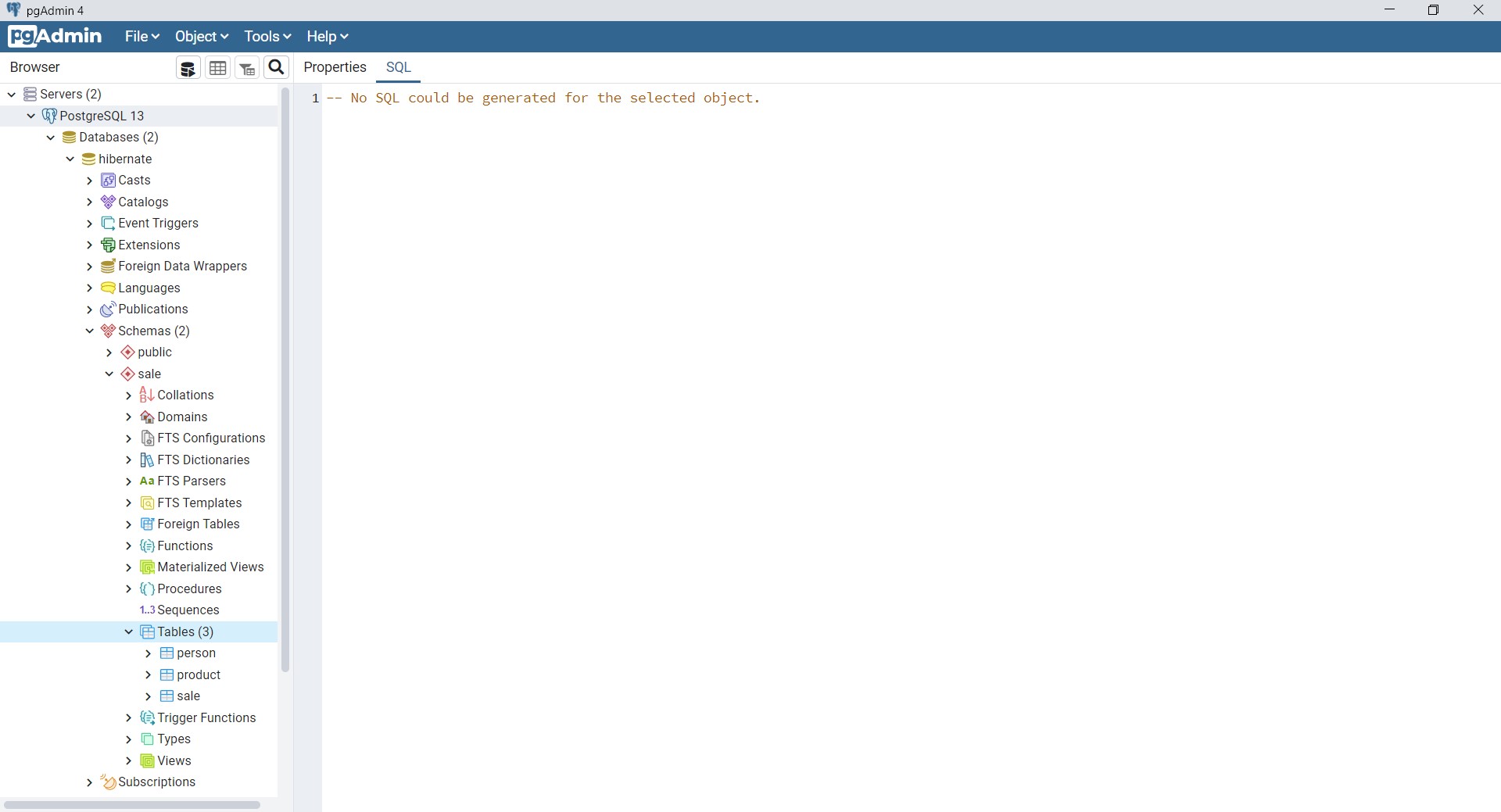
After these configurations, run the application as spring boot aplication. You must have the tables automatically created in your database like in the image below.
Now it is time to create the database repositories. We will use the JpaRepository interface and spring boot will automatically use org.springframework.data.jpa.repository.support.SimpleJpaRepository in the background. We will also add new methods to this interface and spring boot will implement them in the background too. Notice JpaSpecificationExecutor for specification abilities, which i will use to pass specification parameters. I will also implement the Restful endpoints and i will explain the methods there. Here are the 3 repositories for 3 models.
import org.springframework.data.jpa.repository.JpaRepository;
import org.springframework.data.jpa.repository.JpaSpecificationExecutor;

import com.numankaraaslan.springbootjpa.model.Product;

public interface ProductRepo extends JpaRepository<Product, Long>, JpaSpecificationExecutor<Product>
{
}
import java.util.List;

import org.springframework.data.domain.Sort;
import org.springframework.data.jpa.repository.JpaRepository;
import org.springframework.data.jpa.repository.JpaSpecificationExecutor;

import com.numankaraaslan.springbootjpa.model.Person;

public interface PersonRepo extends JpaRepository<Person, Long>, JpaSpecificationExecutor<Person>
{
	public Person findByname(String name);

	public List<Person> findBynameLike(String name, Sort sort);
}
import java.util.List;

import org.springframework.data.jpa.repository.JpaRepository;
import org.springframework.data.jpa.repository.JpaSpecificationExecutor;

import com.numankaraaslan.springbootjpa.model.Sale;

public interface SaleRepo extends JpaRepository<Sale, Long>, JpaSpecificationExecutor<Sale>
{
	public List<Sale> findAllByperson_name(String name);

	public List<Sale> findAllByperson_nameLike(String name);
}
Restful Controllers
Now it is time to implement the restful services. Let me first start with the codes with comments. I will have 3 rest controllers for 3 repositories. There are nothing special about the findById, findAll and save methods here. They are already implemented in the spring jpa repositories using entity managers. They work with generic types so they are suitable for any object you save and find. These endpoints use path variables and response bodies. Jackson object mapping is used in the background automatically. Spring boot to convert models to json format and convert json request bodies to models.
import java.util.List;

import org.springframework.data.domain.Sort;
import org.springframework.http.ResponseEntity;
import org.springframework.web.bind.annotation.GetMapping;
import org.springframework.web.bind.annotation.PathVariable;
import org.springframework.web.bind.annotation.PostMapping;
import org.springframework.web.bind.annotation.RequestBody;
import org.springframework.web.bind.annotation.RequestMapping;
import org.springframework.web.bind.annotation.RestController;

import com.numankaraaslan.springbootjpa.model.Person;
import com.numankaraaslan.springbootjpa.repository.PersonRepo;

import lombok.AllArgsConstructor;

// This controller is a restful controller and produces response bodies
@RestController
@AllArgsConstructor
// This controller will be reached via /person path
@RequestMapping(path = "person")
public class PersonController
{
	// The person repository will be autowired with the help of all args constructor above
	private PersonRepo personRepo;

	// http://localhost:8080/person/findById/1
	@GetMapping(path = "findById/{id}")
	public ResponseEntity<Person> findById(@PathVariable(name = "id") long id)
	{
		return ResponseEntity.ok(personRepo.findById(id).get());
	}

	// http://localhost:8080/person/findAll
	@GetMapping(path = "findAll")
	public ResponseEntity<List<Person>> findAll()
	{
		return ResponseEntity.ok(personRepo.findAll());
	}

	// http://localhost:8080/person/save
	@PostMapping(path = "save")
	public ResponseEntity<Person> save(@RequestBody Person person)
	{
		// {"name":"Adam"}, {"name":"Jack"}, {"name":"Edward"}
		return ResponseEntity.ok(personRepo.save(person));
	}

	// http://localhost:8080/person/findByName/Jack
	@GetMapping(path = "findByName/{name}")
	public ResponseEntity<Person> findByName(@PathVariable(name = "name") String name)
	{
		return ResponseEntity.ok(personRepo.findByname(name));
	}

	// http://localhost:8080/person/findByNameLike/a
	@GetMapping(path = "findByNameLike/{name}")
	public ResponseEntity<List<Person>> findByNameLike(@PathVariable(name = "name") String name)
	{
		return ResponseEntity.ok(personRepo.findBynameLike("%" + name + "%", Sort.by("name").descending()));
	}
}
The product endpoints are simple.
import java.util.List;

import org.springframework.http.ResponseEntity;
import org.springframework.web.bind.annotation.GetMapping;
import org.springframework.web.bind.annotation.PathVariable;
import org.springframework.web.bind.annotation.PostMapping;
import org.springframework.web.bind.annotation.RequestBody;
import org.springframework.web.bind.annotation.RequestMapping;
import org.springframework.web.bind.annotation.RestController;

import com.numankaraaslan.springbootjpa.model.Product;
import com.numankaraaslan.springbootjpa.repository.ProductRepo;

import lombok.AllArgsConstructor;

@RestController
@AllArgsConstructor
@RequestMapping(path = "product")
public class ProductController
{
	private ProductRepo productRepo;

	// http://localhost:8080/product/findById/1
	@GetMapping(path = "findById/{id}")
	public ResponseEntity<Product> findById(@PathVariable(name = "id") long id)
	{
		return ResponseEntity.ok(productRepo.findById(id).get());
	}

	// http://localhost:8080/product/findAll
	@GetMapping(path = "findAll")
	public ResponseEntity<List<Product>> findAll()
	{
		return ResponseEntity.ok(productRepo.findAll());
	}

	// http://localhost:8080/product/save
	@PostMapping(path = "save")
	public ResponseEntity<Product> save(@RequestBody Product product)
	{
		// {"name":"Mouse", "price":100}, {"name":"Keyboard", "price":200}, {"name":"Monitor", "price":300}
		return ResponseEntity.ok(productRepo.save(product));
	}
}
The sale endpoint is where the fun starts :) I will explain the codes later.
import java.util.List;

import javax.persistence.criteria.CriteriaBuilder;
import javax.persistence.criteria.CriteriaQuery;
import javax.persistence.criteria.Predicate;
import javax.persistence.criteria.Root;

import org.springframework.data.domain.Sort;
import org.springframework.data.jpa.domain.Specification;
import org.springframework.http.ResponseEntity;
import org.springframework.web.bind.annotation.GetMapping;
import org.springframework.web.bind.annotation.PathVariable;
import org.springframework.web.bind.annotation.PostMapping;
import org.springframework.web.bind.annotation.RequestBody;
import org.springframework.web.bind.annotation.RequestMapping;
import org.springframework.web.bind.annotation.RestController;

import com.numankaraaslan.springbootjpa.model.Sale;
import com.numankaraaslan.springbootjpa.repository.SaleRepo;

import lombok.AllArgsConstructor;

@RestController
@AllArgsConstructor
@RequestMapping(path = "sale")
public class SaleController
{
	private SaleRepo saleRepo;

	// http://localhost:8080/sale/findById/1
	@GetMapping(path = "findById/{id}")
	public ResponseEntity<Sale> findById(@PathVariable(name = "id") long id)
	{
		return ResponseEntity.ok(saleRepo.findById(id).get());
	}

	// http://localhost:8080/sale/findAll
	@GetMapping(path = "findAll")
	public ResponseEntity<List<Sale>> findAll()
	{
		return ResponseEntity.ok(saleRepo.findAll());
	}

	// http://localhost:8080/sale/save
	@PostMapping(path = "save")
	public ResponseEntity<Sale> save(@RequestBody Sale sale)
	{
		// {"product":1,"person":1}, {"product":1,"person":2}, {"product":2,"person":1}, {"product":2,"person":2}, {"product":3,"person":1}, {"product":3,"person":3}
		return ResponseEntity.ok(saleRepo.save(sale));
	}

	// http://localhost:8080/sale/findAllByPersonName/ward
	@GetMapping(path = "findAllByPersonName/{personname}")
	public ResponseEntity<List<Sale>> findAllByPersonName(@PathVariable(name = "personname") String name)
	{
		return ResponseEntity.ok(saleRepo.findAllByperson_nameLike("%" + name + "%"));
	}

	// http://localhost:8080/sale/findByPersonAndPrice/Adam/150
	@GetMapping(path = "findByPersonAndPrice/{personname}/{price}")
	public ResponseEntity<List<Sale>> findByPersonAndPrice(@PathVariable(name = "personname") String name, @PathVariable(name = "price") int price)
	{
		Specification<Sale> personSpec = new Specification<Sale>()
		{
			private static final long serialVersionUID = -8354621229900183586L;

			@Override
			public Predicate toPredicate(Root<Sale> root, CriteriaQuery<?> query, CriteriaBuilder criteriaBuilder)
			{
				return criteriaBuilder.equal(root.get("person").get("name"), name);
			}
		};
		Specification<Sale> priceSpec = new Specification<Sale>()
		{
			private static final long serialVersionUID = 4964898933388153362L;

			@Override
			public Predicate toPredicate(Root<Sale> root, CriteriaQuery<?> query, CriteriaBuilder criteriaBuilder)
			{
				return criteriaBuilder.greaterThanOrEqualTo(root.get("product").get("price"), price);
			}
		};
		Specification<Sale> spec = Specification.where(personSpec.and(priceSpec));
		Sort sort = Sort.by("product.name").ascending();
		List<Sale> result = saleRepo.findAll(spec, sort);
		return ResponseEntity.ok(result);
	}
}
Derived queries
First lets take a look at these two methods in PersonRepository. They are finding person entities in the database by name column.
public Person findByname(String name);

public List<Person> findBynameLike(String name, Sort sort);
The first method is a derived query and it basically produces "select * from sale.person where name = :name" in the background. This method requires an exact match of field name in the class, not the database column name.
I have also added the second derived query method to find multiple people in the database with like condition. It will produce a query like "select * from sale.person where name like :name order by :sort". This method also includes a Sort condition so that i can sort the results in the database layer. I have called this metod with "personRepo.findBynameLike("%" + name + "%", Sort.by("name").descending())". The "name" parameter in the sort is the field in the person class.
Let's take a look at the SaleRepository methods. These are also derived queries but they are special. Remember i haven't implemented onetomany relations in the person and product models. So i can't find sales via person and product classes. These two methods are finding the sales of one person. For example, i want to find the sales of the person named "Jack", or named like "ack".
public List<Sale> findAllByperson_name(String name);

public List<Sale> findAllByperson_nameLike(String name);
Note the underscore in the queries. They basically mean we are looking into the "name" property of the "person" class. Underscore separates the class and the field so you can query the person name from the sale table. The second query is the same query with like condition, rather than equals condition. These queries are basically joining 2 tables on foreign keys and selecting the sale columns filtering by the person names. Probably something like this: "Select s.* from sale s inner join person p on s.person_id = p.id where p.name like '%ack%'". But we didn't need any join logic in the queries. We also didn't need any criteria api either. I have called these methods by "saleRepo.findAllByperson_nameLike("%" + name + "%")" in the controller. Notice %% signs.
Specification API
Finally it is time to develop the specification api. The need for the specification api arrives when we need to write multiple conditions in where clause and / or search values in the columns of the related tables. For example, if i ask "find me the sales of Jack with higher than 150 dollars", i would have to write a join query with all these 3 tables. I would have to write where conditions for person name AND product price. You may try to implement a derived query for this or a native query or a criteria api query but they are all complex and unintuitive for programmers. Specification api helps us create these queries programmatically. Let's see how we can implement it. Take a look the the comments below:
Specification<Sale> personSpec = new Specification<Sale>()
{
	// We will immplement 2 conditions, one for the person name and one for the product price
	// First condition is the first specification
	@Override
	public Predicate toPredicate(Root<Sale> root, CriteriaQuery<?> query, CriteriaBuilder criteriaBuilder)
	{
		// This line means that the "name" field of the "person" entity of the "sale" entity
		// Must be equal (or you can write like) to the name parameter of the endpoint
		// Simple as that :)
		return criteriaBuilder.equal(root.get("person").get("name"), name);
	}
};
Specification<Sale> priceSpec = new Specification<Sale>()
{
	// The second condition is the second specification
	@Override
	public Predicate toPredicate(Root<Sale> root, CriteriaQuery<?> query, CriteriaBuilder criteriaBuilder)
	{
		// This line means that the "price" field of the "product" entity of the "sale" entity
		// Must be greater than or equal to the price parameter of the endpoint
		// Simple as that :)
		return criteriaBuilder.greaterThanOrEqualTo(root.get("product").get("price"), price);
	}
};
Now i have to combine these conditions. I can combine these 2 conditions togerther with one line. Remember you can combine as much specifications as you want with this structure.
Specification<Sale> spec = Specification.where(personSpec.and(priceSpec));
Apart from the where conditions, i also want to sort these sales by the product name. Notice the product name is not even in the query at this point. Spring boot and hibernate together will create an Order by clause accordingly. I have mentioned the "entity.column" in the sort parameter like below.
Sort sort = Sort.by("product.name").ascending();
Lastly, i don't have to write a new sale repository method for this because i have already extended "JpaSpecificationExecutor" in the SaleRepository. I can easily pass specification and sort parameters to findAll method.
List<Sale> result = saleRepo.findAll(spec, sort);
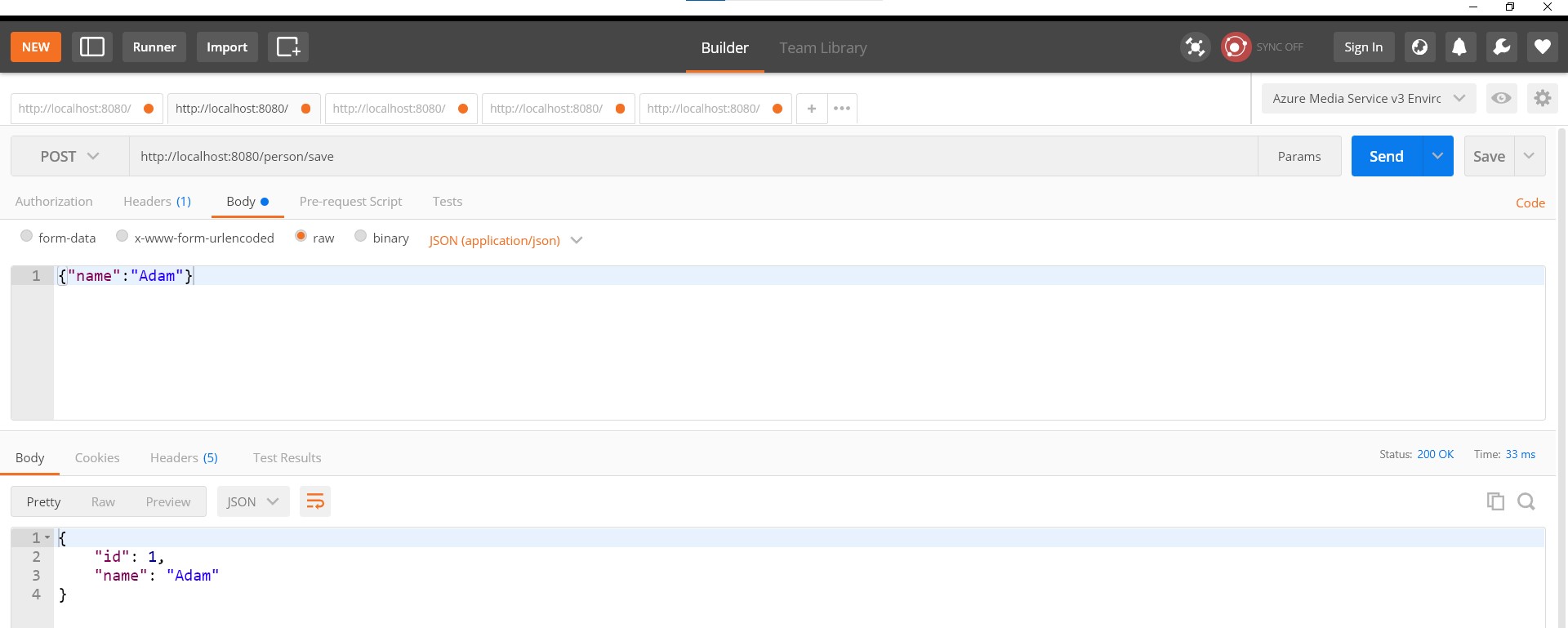
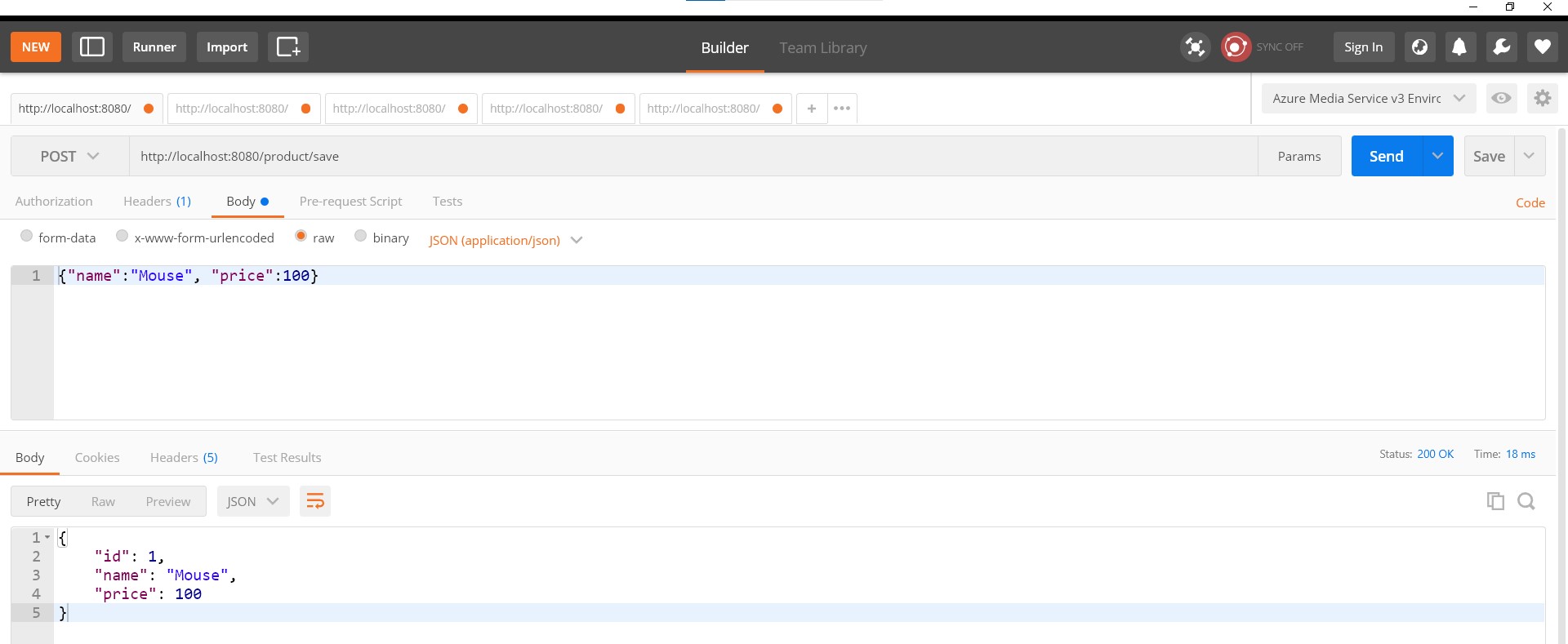
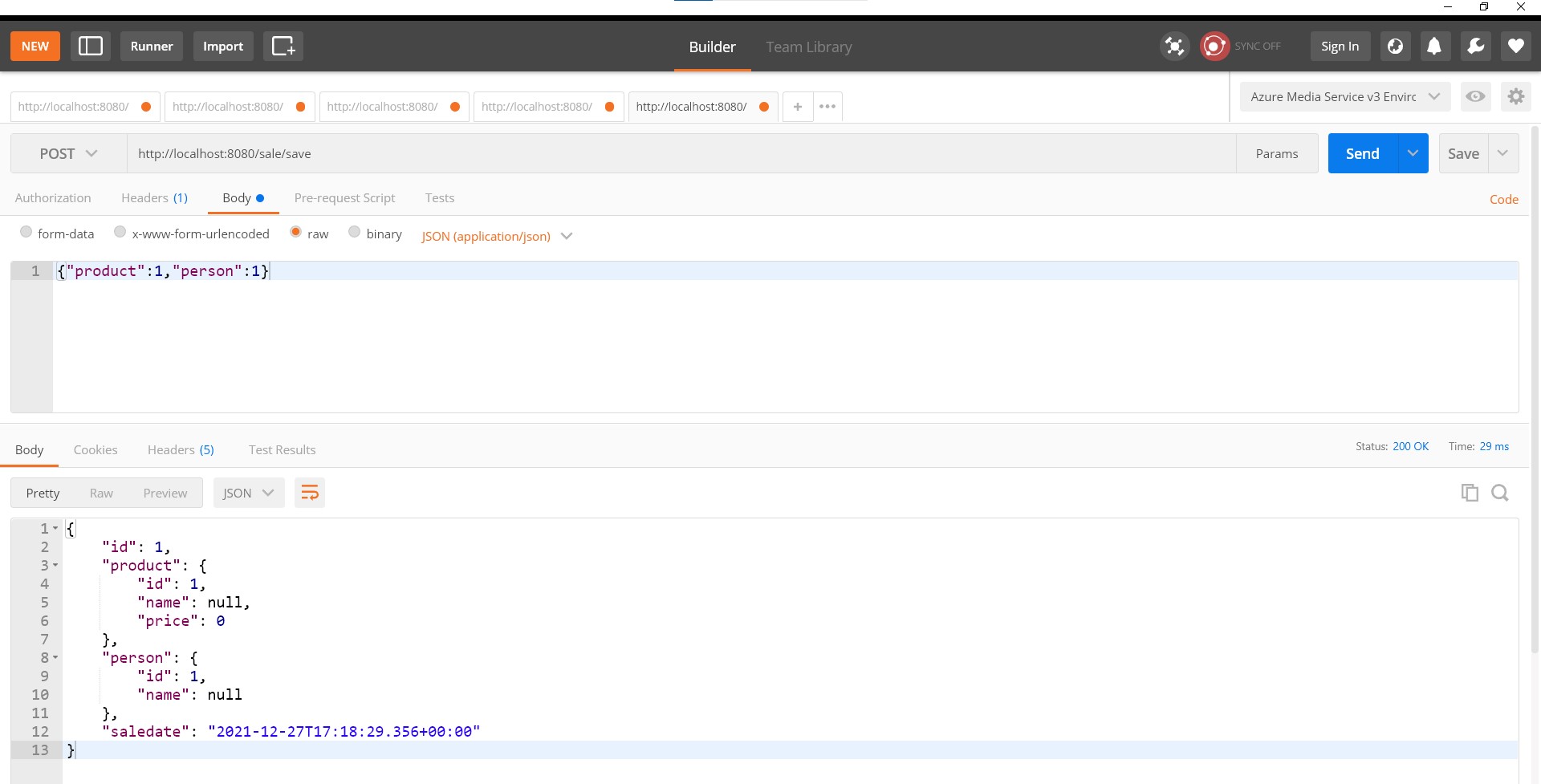
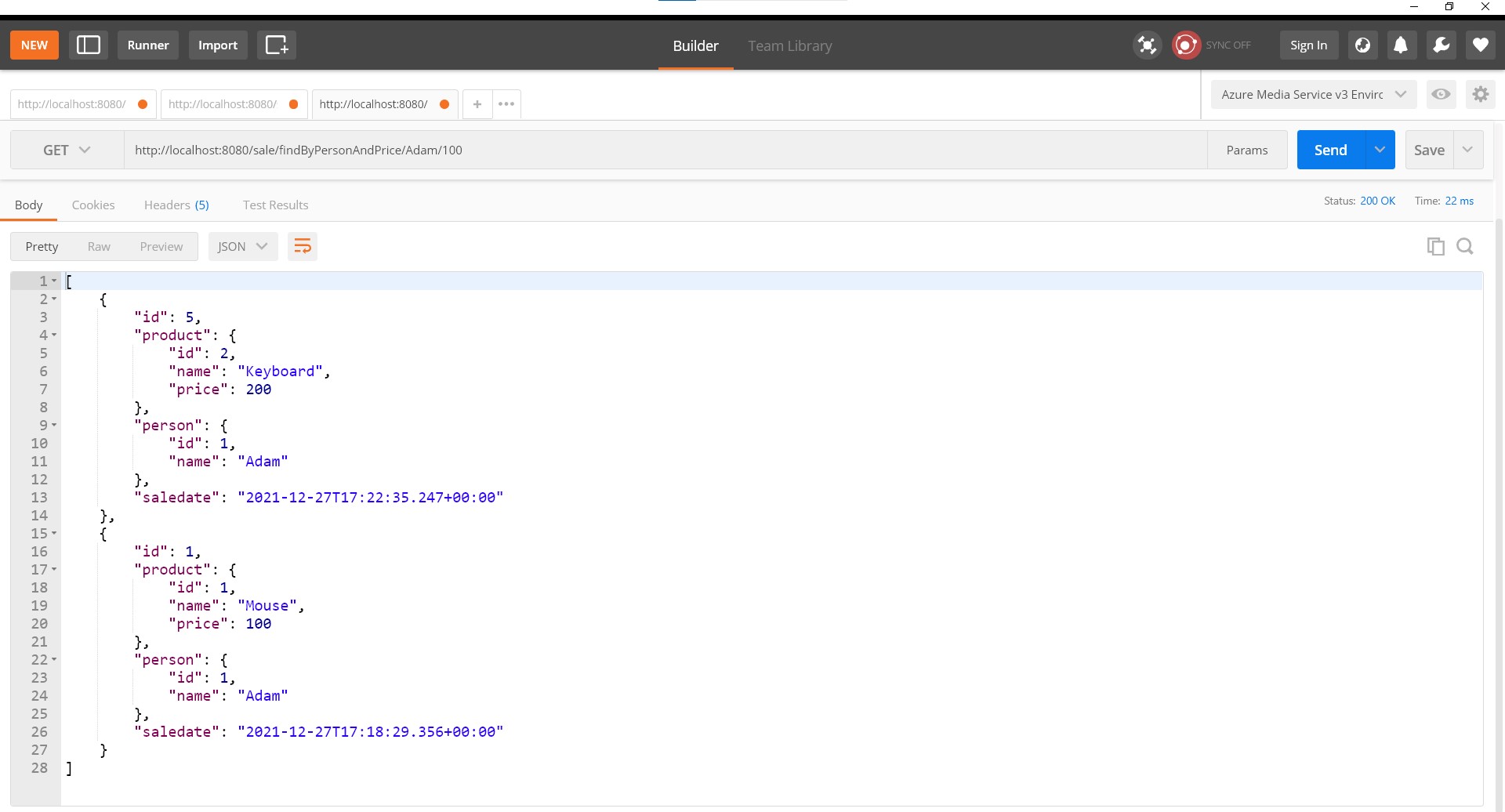
After all these repositories and controllers, you can test these endpoints via the links i have written in the controller classes. You can use the json expressions inside thoese save methods and post them as request bodies. Let me put the images of my tests below.
Why i like the specification api
This api helps you create complex sql queries programmatically. You don't have to understand the joins or criteia api complexity or persistance context. You can easily combine multiple conditions and tables in one single line. Hope this was helpful. See you at the next post :)
Baha
Harika anlatim
Numan Karaaslan
Teşekkür ederim :)
BT
Güzel anlatım elinize sağlık